Launch Center Pro, an iOS utility that offered widgets and custom icons long before they were allowed on the iPhone’s home screen, is bringing its design tools to iOS 14. The app aims to capitalize on the recent trend toward home screen personalization by offering a set of over 7,000 glyphs and emoji that can be used to create custom icons for use with Apple’s Shortcuts app.
In addition, the app offers over 13 icon background styles with 15 colors each, along with other tools to build a customized experience like glyph styling and badges, for example. In total, it has the capability of producing 13 trillion possible icons using its built-in tools — and even more if you choose to use your own photos when creating your icons.
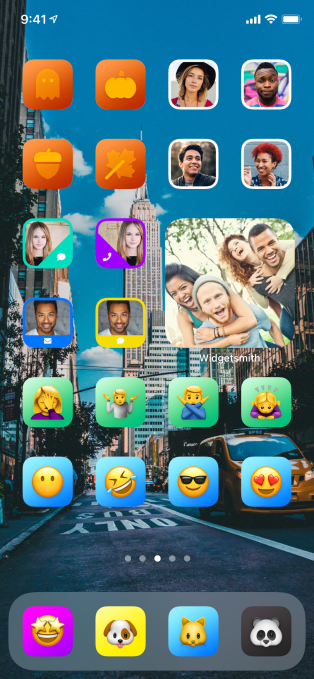
Image Credits: Contrast/Launch Center Pro
Much of the work to make this possible had already been done last year for iOS 13, says Launch Center Pro’s developer David Barnard. But iPhone home screen customization never really took off until this month, thanks to the launch of iOS 14. With the OS update, developers have finally been able to ship widgets of different sizes alongside their apps to offer a more engaging experience directly on users’ home screens.
While the original intention was focused on bringing informational updates from existing apps to the home screen, a handful of developers leveraged the new capabilities to build specialized widget design tools. These widget-making apps have allowed users to create widgets of many sorts and sizes, using a variety of colors and styles. Widgetsmith, for example, has been topping the App Store charts as users began to customize their home screens.
In addition, a number of users figured out how to use Apple’s Shortcuts to replace the icons associated with their favorite apps in order to create entirely unique, themed home screen experiences. Tutorials popped up on TikTok and the hashtag #iOS14homescreen began trending on Twitter as people shared the end results of their iPhone makeovers.
But one obstacle to redesigning the home screen was that you either needed to find a set of custom icons to use or design your own using an app like PicsArt or Photoshop, for example. And this could be challenging for those who don’t regularly work with creative tools. That’s where Launch Center Pro comes in:
@launchcenterproBuild your own custom icons for iOs 14! More tips to come! ##ios14homescreen ##ios14 ##homescreen♬ original sound – Launch Center Pro
The app offers simple tools that let you build your own icons without needing to be a design expert. Instead, you simply pick the icon shape, the color and the glyph, then optionally add a frame or badge. Apple’s Shortcuts app offers a similar set of tools, but with far fewer options.
The icons you make can then either be used with the Shortcuts app by exporting the icon to your Camera Roll or they can be used inside Launch Center Pro’s classic Today View widgets. These widgets can include not just favorite apps, but specific actions or tasks — like messaging a favorite friend, getting directions or anything else you commonly do on your phone.
Spent like an hour creating this layout using @_DavidSmith’s excellent Widgetsmith and @LaunchCenterPro for the icons. #ios14homescreen pic.twitter.com/ZL6hBKY8MZ
— Alex Crocker
(@crockerbytes) September 24, 2020
Unfortunately, Launch Center Pro hasn’t yet released iOS 14-compatible home screen widgets at this time.
However, the team expects to have those ready later this fall, along with other big updates. In the meantime, the company hopes its icon designer will come in handy in these early days of iOS 14 customizations. They also plan on releasing smaller updates focused on improving the icon design experience in the weeks ahead.
Launch Center Pro is available as a free download on the App Store.

from Apple – TechCrunch https://ift.tt/33WJXdd
Comments
Post a Comment